

When my right thumb started complaining last winter, I did not expect to become the kind of reader with strong opinions about page-turn buttons. For years I tapped and swiped my Kindle Paperwhite without thinking about it. Then mild arthritis in my right thumb made every tap on a glass screen a small decision, and I started looking for something with physical buttons. The Kobo Libra Colour is the e-reader I bought in March for exactly that reason. Seven months later, it still earns its place in the blue armchair by the living-room window on the days when my thumb is sore.
This is not a first-impressions review. I have read a good stack of books on this device since March, most of them borrowed from my public library and a handful bought outright. I have read with it in the blue armchair by the living-room window on the days when my thumb is sore, which is the job I bought it for. I have never read with it in bed, because my Paperwhite still lives there. The Kobo has a different job in my house, and it does that job well enough that I wanted to write down what I have learned.
The Quick Verdict
The Kobo Libra Colour is the reader I reach for when my hands hurt. The page-turn buttons are a genuine comfort feature, the color screen is a pleasant extra, and the library loans work the way they should. It is not perfect, but it does the one thing I asked it to do.
Amazon Check Today's Price →The e-reader that fixed my sore-thumb problem
If you have been weighing a reader with physical page-turn buttons, this is the one I have kept reaching for since March. It is comfortable to hold, easy on the eyes, and the library loans are built right in.
Amazon Check Today's Price on Amazon →How I've Used It
I bought the Kobo Libra Colour in March 2026, after a winter when my thumb arthritis flared and tapping the Paperwhite screen started to hurt. I did not buy it for the color screen, and I did not buy it for library wait lists, because my library loans already arrive on the Kindle through Libby. I bought it for one reason: the two physical page-turn buttons on the side.
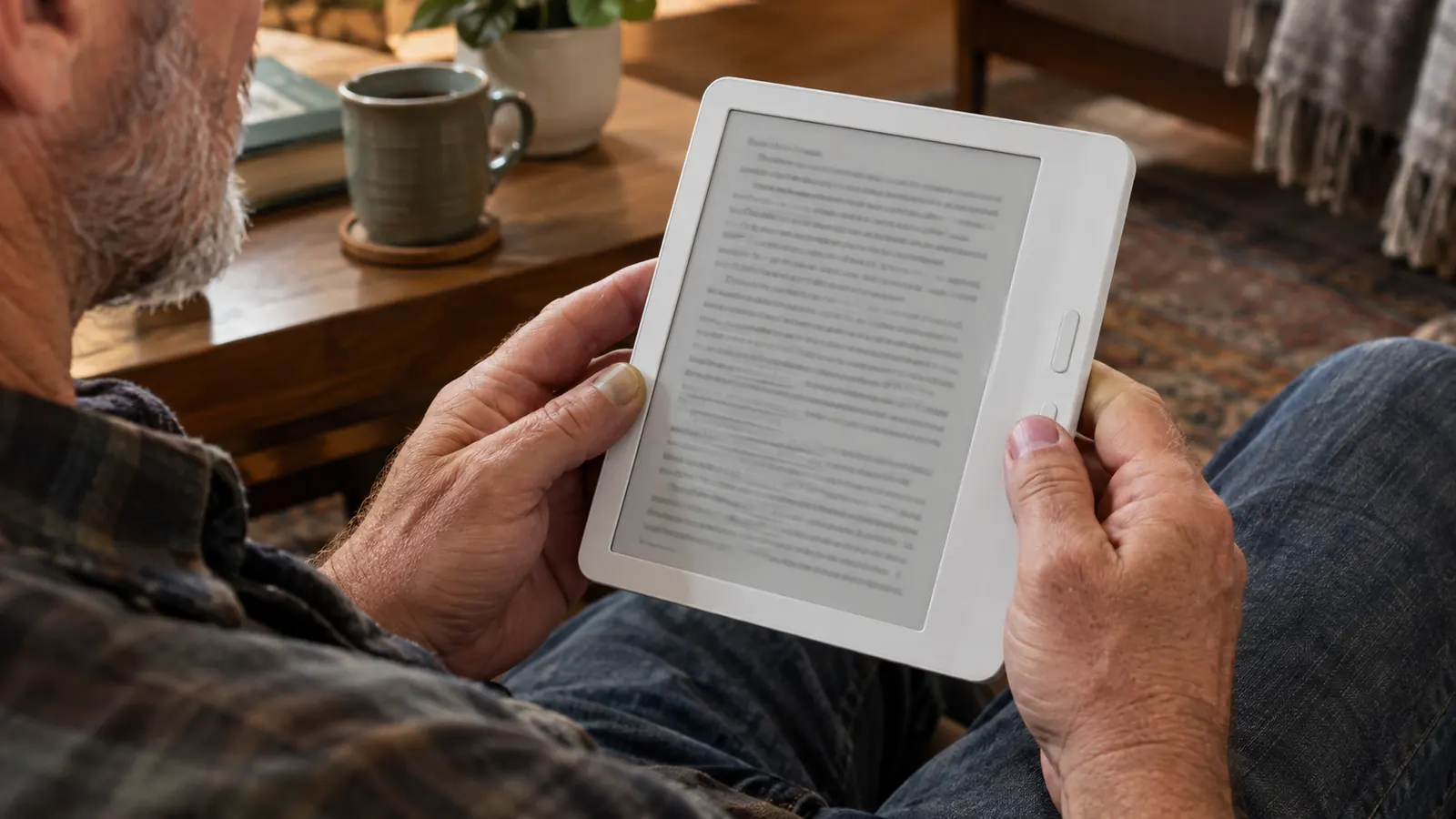
Those buttons sit on the wider bezel, so the screen rotates and I can hold the device in either hand. I usually hold it in my left hand and use my left thumb to turn pages, which gives my right thumb a rest. The buttons give a soft click, not a loud snap, and they are placed where my thumb naturally rests. After a long reading session, my thumb does not ache the way it used to.
I have read two library books at a time on it, which is how I usually work through a mystery and a work of nonfiction together. The home screen keeps both on my shelf, and the device remembers exactly where I stopped in each one. That may sound like a small thing, but for a person who reads two or three books a week, it saves me from a lot of page hunting.
I read it bare, with no case. It is lighter to hold that way, and the buttons are easier to reach. It has never been in water, though I once wiped spilled iced tea off the screen and it was fine. I use it in the armchair on bad-thumb days, never in bed. The Paperwhite is still my bedtime reader, because that is where I have always read before sleep.
One thing that surprised me is how much I look forward to it on bad-thumb days, instead of dreading them. The buttons make page turns feel deliberate and quiet, and the device is comfortable enough that I forget I am holding it. I have fallen asleep in the armchair with it more than once, which is the highest compliment I can give any reading device.
Why the Page-Turn Buttons Won Me Over
Before I bought this reader, I assumed page-turn buttons were a throwback. Then I spent a week tapping the Paperwhite with a sore thumb and realized I was subconsciously avoiding page turns, reading shorter sessions, and holding the device differently to make the taps easier. The buttons changed that.
With the Kobo, I do not think about page turns at all. My thumb rests on the button and presses it without any reaching or stretching. I can read for two hours in the armchair and the only thing that makes me stop is the book itself. For anyone with arthritis, tendonitis, or simply tired hands, this is the feature that matters most, and it is the reason I would choose the Libra Colour over a reader without buttons.
The buttons are on one side only, which is worth knowing. The screen rotates, so I can flip the device and hold it in either hand, but the buttons themselves stay on the same physical side. I hold it in my left hand most of the time, so this has never bothered me. If you are strongly right-handed and want to hold it in your right hand, you would simply rotate the screen and use the buttons with your right thumb, which works fine.
I should also say that the buttons are not noisy. They make a soft click that I can feel more than hear. That matters to me because I read next to Dale in the evenings, and a loud clicking button would drive both of us crazy. This one stays out of the way.
The Color Screen: Nice, but Not the Reason to Buy
The 7-inch Kaleido 3 color screen is the headline feature, and it is genuinely pleasant. Book covers show up in color on the home screen and in the library, which makes browsing feel more like a real shelf. Comic books and illustrated nonfiction look better than they would on a black-and-white reader.
But I want to be honest: I did not buy this for color, and I would not tell anyone to buy it for color alone. Color e-ink is softer and less punchy than a tablet screen, and the color adds a layer of texture over the text that some people notice more than others. For plain novels, which is most of what I read, the color is simply not a factor. The text is sharp and comfortable, and that is what matters.
I have not used the stylus, because it is sold separately and I never bought one. The device supports it, but for my reading life, a stylus is not something I need. If you want to annotate a lot, the Kindle Scribe in my house gets that job, not this reader.
One more honest note about color: it does not glow or pop the way a tablet screen does. That is actually part of the appeal for me. It looks like ink on paper, just with a little more life in the covers. When I want bright color, I use the tablet on the kitchen counter during the day. When I want to read, I want the Kobo.
Library Loans, Audiobooks, and the Everyday Stuff
The Kobo has library loans built in through OverDrive and Libby, which means I can borrow a book from my library and have it appear on the device without plugging it into a computer. I have used this a lot. My library's digital collection is the main way I read, so this feature matters more to me than color.
I also appreciate that the device handles audiobooks over Bluetooth. I have not used this much, because I prefer reading with my eyes, but it is nice to know the option is there. Dark mode is included as well, though I do not use it. At night I use the warm light on my Paperwhite, and on the Kobo I keep the brightness low and the warmth up.
The battery is what I expect from a modern e-reader: it lasts for weeks, not days. I charge it about once a month, sometimes less often. I do not track exact hours, but I have never been caught with a dead reader when I wanted to read. That is the whole point of a device like this.
The borrowing flow took me a few minutes to learn the first time, mostly because I was used to the Kindle version. Now it is second nature. I search for a title on the device, place a hold if it is checked out, and the book shows up when it is ready. For a person who reads two or three books a week, that is a feature I use constantly.
Where the Kobo Libra Colour Falls Short
No review is honest without the tradeoffs, so here are mine. First, the color screen is not as crisp as a tablet, and on bright days there is a faint texture to the background that I notice when I look for it. It does not bother me while reading, but it is there.
Second, the device is a little wider than a typical black-and-white reader because of the bezel that holds the buttons. That is a fair trade for me, but if you want the narrowest possible reader, this is not it. Third, the stylus is sold separately, which feels like an extra expense if you want to use the full feature set.
Finally, the Kobo is not the best choice for someone deeply invested in Amazon's ecosystem. My Kindle books live on my Kindle, and the Kobo does not read them. I buy most of my books from the library, so this has not been a problem, but it is worth knowing before you switch. My Paperwhite and Kobo coexist because they do different jobs.
None of these are deal breakers for me. The width is a trade I make gladly for the buttons, the stylus was never part of my plan, and the ecosystem issue only matters if you have a large Kindle library. I am lucky that my reading life runs through the library, so the Kobo fits right in.
What I Liked
- Physical page-turn buttons are a real comfort feature for sore hands
- Library loans built in through OverDrive and Libby work smoothly
- Waterproof, dark mode, and audiobook support cover the basics
- Comfortable to hold bare, with buttons placed where the thumb rests
- Color covers and illustrated books look genuinely nice
Where It Falls Short
- Color screen adds a faint texture and is not as crisp as a tablet
- Stylus is sold separately, so the full feature set costs extra
- Bezel is a little wider than a black-and-white reader
- Amazon Kindle books do not transfer over, so ecosystem matters
The buttons are the whole reason I reach for this reader on days when my thumb is sore. Everything else is a bonus.
Who This Is For
The Kobo Libra Colour is for readers who hold a device for hours and want the page-turn to happen where the thumb already rests. It is for people with arthritis, tendonitis, or simply tired hands from a long day. It is for library readers who want loans to land on the device without a computer in between.
It is also for people who want color for covers and illustrated books without giving up the comfortable e-ink reading experience. If you read novels, mysteries, and historical fiction, the color will not change much, but the buttons will. If you read graphic novels or heavily illustrated nonfiction, the color is a genuine upgrade.
And it is for anyone who wants a reading device that feels like a book rather than a miniature tablet. The e-ink screen is easy on the eyes, the buttons are satisfying to press, and the whole thing gets out of the way so you can just read. That is the feeling I look for, and it is why I keep coming back to it.
Who Should Skip It
If you never notice your hands while reading, the buttons are a nice extra but not a necessity, and a lighter or narrower reader might suit you better. If you buy most of your books from Amazon, the Kindle side of the ecosystem will be simpler, because your existing purchases will not move over.
And if you want a device for note-taking, the stylus being sold separately makes the Kobo less appealing than a reader that includes one. My Kindle Scribe handles that job in my house. The Kobo Libra Colour is a reading device first, and that is exactly what it does well.
I would also say that if color is the only reason you are looking at this reader, spend some time with one first. The color is subtle, and some people expect more from the word color than e-ink can deliver. For me, the buttons are the reason to buy, and the color is a happy side effect.
Still weighing a reader with buttons?
If your hands ache after long reading sessions, the physical page-turn buttons on the Kobo Libra Colour are worth trying. It has been my bad-thumb reader since March, and I have no plans to change that.
Amazon Check Today's Price on Amazon →